


Picture yourself playing the best solo of the night, and suddenly your guitar cuts out for a split second. The crowd may not notice, but you definitely will. Guitar wireless dropouts are a common problem for guitarists, especially when playing in busy venues.
The good news is that most of the causes can be prevented. In this article, we look at why a guitar wireless signal drops, how to diagnose the problem quickly, and how to choose a wireless system that handles interference better.
Why Does a Guitar Wireless Drop Out?
A guitar wireless sends your signal through radio waves. Anything that disrupts the path or the frequency of those waves can cut your sound. These are the most common causes:
- A crowded 2.4 GHz band. This frequency is also used by Wi-Fi routers, Bluetooth devices and many other wireless gadgets. In a packed venue, the band can get very busy.
- Too much distance or obstacles. Wireless range is usually measured in line of sight, meaning the transmitter and receiver "see" each other with nothing in between. Your body, walls, metal racks or large amps can weaken the signal.
- Poor receiver placement. A receiver sitting on the floor behind an amp or next to a router loses signal more easily.
- Low battery. A nearly empty battery can make the connection unstable before the unit actually shuts down.
- Channel conflicts. When several wireless systems share a stage, identical channels can interfere with each other.
- A loose or dirty jack. Sometimes the problem is not radio at all, but the physical connection at your guitar's input.
How to Diagnose the Problem Quickly
Notice when the dropouts happen. The symptom points you to the cause:
| Symptom | Likely cause | What to check |
|---|---|---|
| Drops when you walk away | Too much distance or obstacles | Receiver position and line of sight to the stage |
| Drops as the venue fills up | The 2.4 GHz band is getting crowded | Channel, router position, or switching to 5.8 GHz |
| Drops when you turn around | Your body is blocking the signal | Transmitter and receiver placement |
| Drops more often late in the set | Low battery | Charge fully before the show |
| Crackles when the guitar or plug moves | Loose or dirty jack | Guitar input and transmitter plug |
| Drops when another wireless system turns on | Channel conflict | Switch to a different channel |
8 Ways to Fix Guitar Wireless Dropouts
- Charge fully before every show. Do not wait for the battery light to turn red, because the connection can become unstable before that.
- Keep a clear line of sight. Avoid walls, amps or metal racks between the transmitter and receiver.
- Place the receiver higher. Put it at the front of your pedalboard or on top of your amp, not on the floor behind it.
- Keep the receiver away from Wi-Fi routers. If possible, ask the venue to move the router, or turn off Wi-Fi on unused devices near the stage.
- Use different channels. If your band uses several wireless systems, give each one its own channel.
- Clean and tighten the jack. Make sure the transmitter plug is fully seated in your guitar's input and does not wobble.
- Walk the stage during soundcheck. Move around the whole area you will use to find any weak signal spots.
- Bring a backup guitar cable. If interference still appears mid-show, a backup cable saves the performance.
Wireless range figures are measured in line of sight with no obstacles. In a real venue, the effective range is usually shorter, so leave a safety margin.
Choosing a Guitar Wireless That Handles Interference Better
If you often play busy venues, your choice of wireless system matters too. Here are three NUX guitar wireless systems, each with a different approach to interference:
NUX B-2 Plus
A narrower transmission bandwidth helps it find the clearest channel. With 4 channels, up to 4 units can run at the same time.
NUX B-8
Constantly scans and switches to the clearest channel to avoid Wi-Fi and Bluetooth interference. Its pedal receiver adds a tuner and boost.
NUX C-5RC
Uses the 5.8 GHz band, which is less crowded than 2.4 GHz, so it faces less interference from other devices.
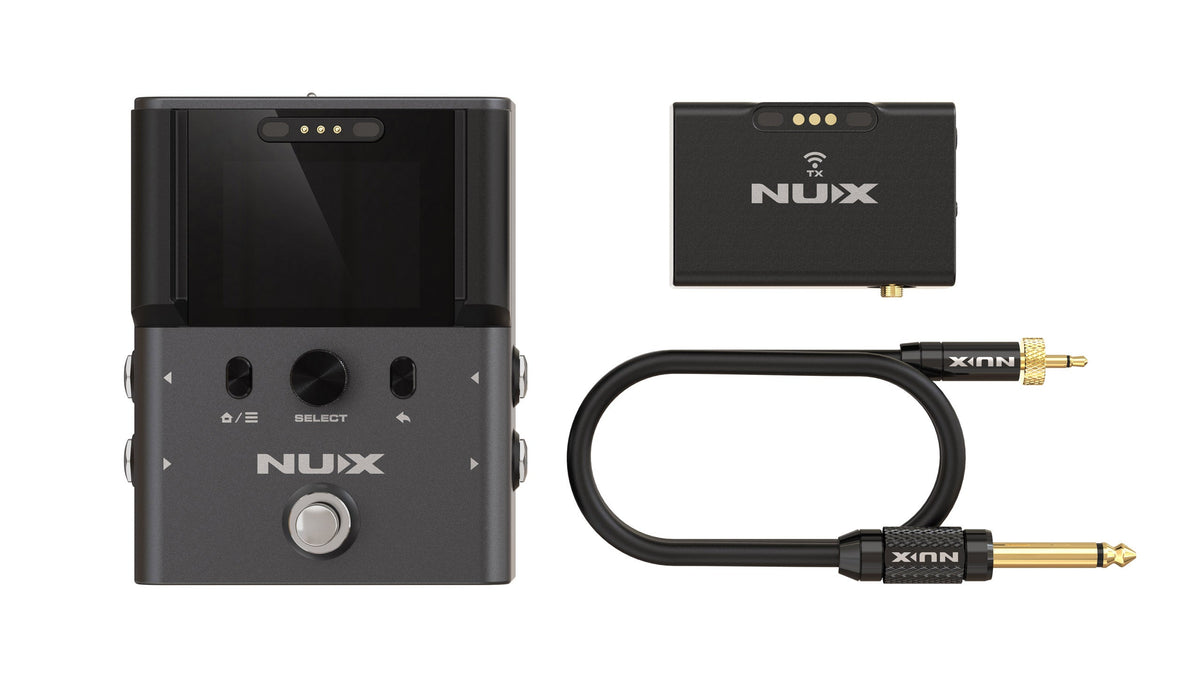
| Feature | B-2 Plus | B-8 | C-5RC |
|---|---|---|---|
| Frequency band | 2.4 GHz | 2.4 GHz | 5.8 GHz |
| Interference approach | Narrower bandwidth, 4 channels | Automatic frequency hopping | Less crowded band |
| Range (line of sight) | Up to ~15 m (60 ft) | Up to ~50 m (165 ft) | Up to ~30 m (100 ft) |
| Latency | < 5 ms | ~2.5 ms | < 5 ms |
| Battery | ~7 hours | ~7 hours | 4 hours + charging case up to 15 hours |
| Best for | Practice and small stages | Large stages and pro players | Venues crowded with wireless devices |
Besides frequency hopping, the B-8 beltpack transmitter has a jack design that keeps the plug from rotating or loosening when you move a lot. That helps prevent one of the most overlooked causes of dropouts.
Guitar Wireless Dropout FAQ
Why does my guitar wireless drop out when the venue gets busy?
Many devices, such as Wi-Fi routers and Bluetooth gear, use the 2.4 GHz band. The busier the venue, the more crowded the band, which raises the risk of interference.
Is a 5.8 GHz wireless more stable?
The 5.8 GHz band is generally less crowded than 2.4 GHz, so there is less risk of interference from other devices. Keep a clear line of sight between the transmitter and receiver.
Can I use several guitar wireless systems on one stage?
Yes, as long as each system uses a different channel. The NUX B-2 Plus has 4 channels, so up to 4 units can run at the same time.
Does a guitar wireless add delay?
NUX guitar wireless systems have very low latency: under 5 ms for the B-2 Plus and C-5RC, and about 2.5 ms for the B-8.
What should I do if my wireless drops out mid-show?
Switch to a backup guitar cable to keep the show going, then check the battery, receiver position and channel after your set.
Conclusion
Guitar wireless dropouts usually come from a crowded frequency band, distance and obstacles, receiver placement, low batteries, channel conflicts or a loose jack. With the right preparation before the show, most of these problems can be prevented.
If you often play busy venues, consider a system built to handle interference, such as the B-8 with frequency hopping or the C-5RC on the 5.8 GHz band.